Notes app — Architecture on the frontend?
Personally, I think architecture on the frontend is fairly tricky. From my own experience on React projects, the file structure tends to scale quickly and, before you know it, navigating the project is a challenge in itself.
The way I see it, there are 3 key factors to keep in mind when building frontend solutions:
- Remove unnecessary re-renders by avoiding extra
useEffects and overusing prop drilling. - Handle the network properly to avoid unnecessary calls to the backend.
- Navigate the file structure efficiently.
Here are some of the reflections I found most interesting:
Standardize the project’s architecture
The idea behind this architecture is to separate the application logic —things like HTTP calls and models— from the visual part of pages and components as much as possible.
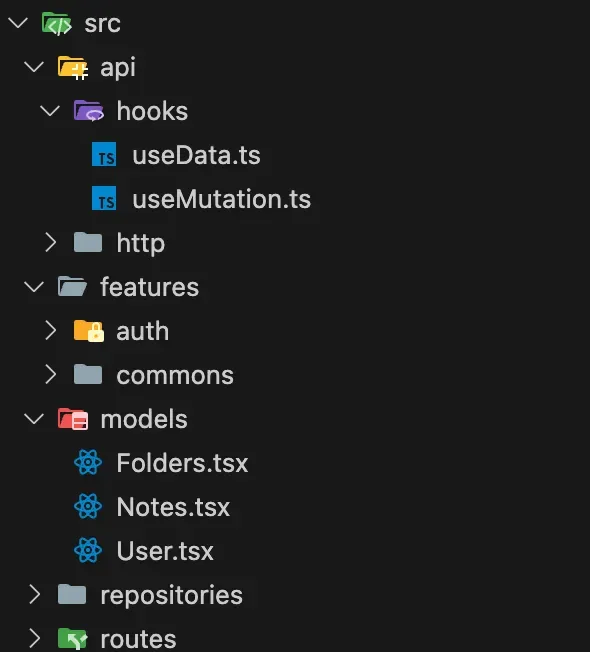
If the application grows considerably we can split our models by bounded context, although I lean more towards keeping the models separate from the features, so there is a clear distinction between the data modeling of our application and the visual side.
Decouple HTTP calls
A pretty interesting way to define a single kind of HTTP call (POST, DELETE, GET, PATCH, PUT) is to wrap your calls with generic types. This gives us much more flexibility if we decide to switch libraries. Here is an example of how to do it with axios and with fetch:
With axios:
import axios, { AxiosRequestHeaders } from 'axios';

type Headers = AxiosRequestHeaders;

const get = async <T>(url: string, headers?: Headers): Promise<T> => {
  const response = await axios.get<T>(url, { headers });
  return response.data;
};

const post = async <T, K>(url: string, body: K, headers?: Headers): Promise<T> => {
  const response = await axios.post<T>(url, body, {
    headers: {
      ...headers,
      Accept: 'application/json',
      'Content-Type': 'application/json',
    },
  });
  return response.data;
};

export const http = {
  get,
  post,
};
With fetch:
type Headers = { [key: string]: string };

const get = async <T>(url: string, headers?: Headers) => {
  const response = await fetch(`${url}`, {
    method: 'GET',
    headers: { ...headers },
  });
  return (await response.json()) as T;
};

const post = async <T, K>(url: string, body: K, headers?: Headers) => {
  const response = await fetch(`${url}`, {
    method: 'POST',
    headers: {
      ...headers,
      Accept: 'application/json',
      'Content-Type': 'application/json',
    },
    body: JSON.stringify(body),
  });
  return (await response.json()) as T;
};

export const http = {
  get,
  post,
};
It also helps the project keep a single request definition, so in principle we won’t end up with multiple files holding an absurd amount of requests.
With this call definition we can create one repository per scenario we need, keeping everything more organized.
Decouple tanstack/react-query
For those who don’t know the library, react-query lets us cache the HTTP calls we make so that handling that data is more efficient, and it gives us plenty of conveniences for working with async data in our application.
When we use this library we’re also prone to ending up with multiple files, each holding a useQuery and/or a useMutation. If at some version the library changes the way it talks to its API, we’d have to change how we declare those functions in every single one of those files.
To avoid this problem, we can build our own hooks:
import { useQuery } from '@tanstack/react-query';

type Status = 'pending' | 'error' | 'success';

interface UseData<T> {
  key: string;
  fetcher: () => Promise<T>;
}

interface Response<T> {
  data: T | undefined;
  status: Status;
}

export const useData = <T>({ key, fetcher }: UseData<T>): Response<T> => {
  const { data, status } = useQuery<T, string>({ queryKey: [key], queryFn: fetcher });
  return { data, status };
};
import { useMutation, useQueryClient } from '@tanstack/react-query';
interface UseDataMutation<T> {
key: string;
mutation: (data: T) => Promise<T>;
}
export const useDataMutation = <T>({ key, mutation }: UseDataMutation<T>) => {
const { mutateAsync: reactQueryMutate, status, data } = useMutation({
mutationFn: (data: T) => mutation(data),
});
const queryClient = useQueryClient();
const mutate = async (data: T) => {
await Promise.all([
reactQueryMutate(data),
queryClient.invalidateQueries({ queryKey: [key] }),
]);
};
return { mutate, status, data };
};Based on our needs we can add fields to our hooks to pass them on to the useQuery or useMutation options, and we can also return whatever we’re interested in.
Centralize queries
Finally, to centralize the calls to the backend I find it interesting to apply the repository pattern on the frontend. The result would look like this:
const AuthRepository = () => {
  const baseUrl = 'http://localhost:8082';

  const {
    mutate: loginMutate,
    status: loginStatus,
    data: loginData,
  } = useDataMutation<User>({
    key: 'login',
    mutation: (user: User) => http.post<User, User>(baseUrl + '/api/v1/auth/login', user),
  });

  const {
    mutate: registerMutate,
    status: registerStatus,
    data: registerData,
  } = useDataMutation<User>({
    key: 'register',
    mutation: (user: User) => http.post<User, User>(baseUrl + '/api/v1/auth/register', user),
  });

  const loginUser = async (user: User) => {
    return await loginMutate(user);
  };

  const registerUser = async (user: User) => {
    return await registerMutate(user);
  };

  return {
    login: loginUser,
    loginResponse: { status: loginStatus, data: loginData },
    register: registerUser,
    registerResponse: { status: registerStatus, data: registerData },
  };
};

export default AuthRepository;
With all of this, our register component would end up like this:
export const Register = () => {
  const { register } = AuthRepository();
  const toast = useToast();

  const registerUser = async (user: User) => {
    register(user)
      .then(() => {
        toast.add('User registered successfully', 'success');
      })
      .catch((error) => {
        const message = (error.response?.data as string) || 'Network error';
        toast.add(message, 'error');
      });
  };

  return (
    <div className="h-full w-full flex flex-col items-center justify-center">
      <div className="bg-white p-8 w-4/5 md:w-1/2 lg:w-1/3 flex flex-col items-center justify-center space-y-6 shadow-lg rounded-lg animate-fadeIn">
        <div className="flex items-center justify-center p-4 w-full h-20 animate-fadeIn">
          <Image src="icons/user.png" alt="Note icon" width={50} height={50} />
          <h1 className="text-5xl font-bold ml-4">Register</h1>
        </div>
        <UserForm mode="register" onSend={registerUser} />
        <Link href="/login"> Already have an account? Login </Link>
      </div>
    </div>
  );
};
Thanks a lot for reading this far! Any feedback is welcome. If you want to follow the project’s progress, you can check out the repository here.