Java — JVM, JDK, JRE & memory
In the world of software development, we often move so fast that we forget the fundamentals of an information system.
Back in my university days, I constantly asked myself: why do I need to understand how things work at a low level? What’s the point of learning about concepts like memory, instruction execution in an ALU, or how assembly language works?
Today, as an IT professional, I clearly see the advantages of deeply understanding how systems behave. If I had to sum it up in one word, it would be: optimization. And optimizing processes also means reducing costs.
In short: optimization = less hardware / vertical scaling = savings on your organization’s infrastructure.
Today, many companies rely on the Spring ecosystem with Java, and its popularity keeps growing due to how easily it enables the development of robust enterprise tools. However, when dealing with applications that handle large volumes of data, software efficiency becomes critical.
To understand how to optimize Java, it’s essential to first understand how Java applications work within our systems, how they interact with the system to perform tasks, and how we can adopt strategies to simplify both the compilation process and efficient memory management.
What is Java?
Java is a programming language designed as a solution to handle complex computer processes using a high-level language that is closer to human language.
This means that, like any high-level programming language, Java must be translated into the instruction set of the operating system to perform various functions. This is where the Java compiler comes into play.
When we say that Java is cross-platform, this is the reason:
- The programmer writes a
.javafile. - The
javaccompiler, included in the Java JDK, translates the code into bytecode (.classfiles). - The JVM (Java Virtual Machine), also part of the JDK, translates the
.classfiles into machine code specific to the operating system. - The operating system interprets that code and executes the corresponding tasks.
In short, different JDK versions exist for each operating system and for specific processor architectures.
With this in mind, we could say that to develop a Java application, all you really need is a text editor and the correct JDK for your operating system. However, when talking about Java, these concepts often come up: JDK, JRE, JVM. What do they actually mean, and how are they related?
JDK, JRE & JVM
Visually, let’s imagine that Java started as just a language with its compiler, similar to C++, but with one big difference: the addition of the JVM, which translates bytecode into machine language. The process would look like this:

So far, we’ve learned a few key things about Java:
- Its cross-platform nature comes from the fact that Java is “compiled” twice: first into bytecode, then into machine code depending on the operating system where it runs.
- The JVM (Java Virtual Machine) is responsible for interpreting that bytecode, but it also manages many other tasks (which we’ll explore later).
- The Java ecosystem includes tools that vary depending on the operating system where the application runs.
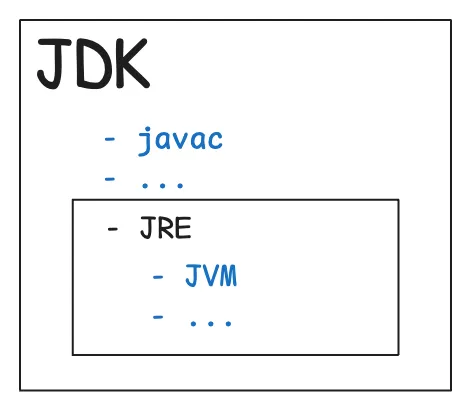
With this in mind, the JDK (Java Development Kit) was created: a collection of tools and programs developed by the Java team to make it easier to develop and run Java programs. It’s important to emphasize that the JDK is primarily aimed at developing applications.
However, in production environments, we often just want to run applications, not develop them. The JDK includes many features that aren’t needed for simple execution. This is where the JRE (Java Runtime Environment) comes in: a package that provides everything required to run a Java application without the additional development tools.
A global diagram would look like this:
Quick recap
Now that we understand what each component does, here’s a quick summary you can use when explaining them:
- JDK (Java Development Kit): a toolkit that allows you not only to run, but also to develop Java programs in environments such as IDEs.
- JRE (Java Runtime Environment): includes everything needed to only run pre-compiled Java applications.
- JVM (Java Virtual Machine): the virtual machine that translates the bytecode generated by the Java compiler into instructions that the operating system can understand and execute.
JIT (Just-In-Time compilation)
Another interesting feature we can add to our diagram is JIT (Just-In-Time compilation). This process improves the JVM’s execution speed and works as follows:

When we run a .java file, some parts of the code are called “hot code”. This refers to code that is executed repeatedly. The JVM detects these frequently executed sections and compiles them at runtime to avoid interpreting them every time. This process is known as JIT (Just-In-Time compilation).
public class Example {
    public static void main(String[] args) {
        for (int i = 0; i < 1000; i++) {
            helloWorld();
        }
    }

    public static void helloWorld() {
        System.out.println("Hello world");
    }
}
On the first execution of the for loop, the helloWorld() method is interpreted normally. The JVM will then recognize that this function is executed very frequently (making it “hot code”) and will compile it at runtime using JIT, improving performance for subsequent calls.
Memory in Java
As we mentioned earlier, the key to optimization is understanding the fundamentals. In Java, memory is divided into two main areas:
- Heap: stores objects and arrays; it is managed by the Garbage Collector.
- Stack: the execution stack where local variables, references, and method calls are stored. Each thread has its own stack, which is cleared when the method completes.
When running Java applications, you can set memory limits using parameters like:
java -Xms512m -Xmx2g -Xss1m -jar example.jar-Xms→ initial heap size (e.g.,-Xms512m→ 512 MB)-Xmx→ maximum heap size (e.g.,-Xmx2g→ 2 GB)-Xss→ stack size per thread (e.g.,-Xss1m→ 1 MB)
Here’s a simple example of how memory is allocated in Java:
public class Example {
    public static void main(String[] args) {
        int posX = 1;          // -----------------------------> STACK
        int posY = 2;          // -----------------------------> STACK
        Object coordinate = new Object(posX, posY); // --------> HEAP
    }
}
The takeaway is that the memory area to watch most closely is the Heap, since poor management can severely affect performance. This is where the Java Garbage Collector plays a critical role.
Garbage Collector
In Java, performance issues can occur when the Heap is insufficient. Generally, this indicates poor memory management. Let’s review the most common memory errors and the available Java garbage collectors.
Common memory errors
- Java heap space: not enough memory to allocate another object in the heap.
- GC overhead limit exceeded: the Garbage Collector tried to free memory several times unsuccessfully, and the heap still has less than 2% free space.
- Metaspace: not enough memory to store class metadata.
Consideration: when the Garbage Collector runs, Java pauses application execution, which can lead to reduced efficiency.
Types of garbage collector
- Serial GC (
-XX:+UseSerialGC): simple and older; uses a single thread. Best for small or embedded applications. Causes long pauses since it stops the entire application. - Parallel GC (
-XX:+UseParallelGC): uses multiple threads to reduce pause times. - G1 GC (
-XX:+UseG1GC): the default since Java 9; splits the heap into regions, collects garbage in parallel, and offers short, predictable pauses. Ideal for large applications with low latency requirements. - ZGC (
-XX:+UseZGC): introduced in Java 11; designed for ultra-low latency and massive heaps (several terabytes), with pause times under 10 ms. - Shenandoah (
-XX:+UseShenandoahGC): developed by Red Hat and officially included since Java 12; delivers extremely short pause times, independent of heap size.
Now that we have a clearer understanding, we can experiment with different strategies in our projects and choose the one that best fits our needs.
To improve memory management in Java applications, consider using primitive types instead of wrapper classes whenever possible, as primitives consume less memory and avoid unnecessary object creation. Also, reuse objects rather than creating new ones repeatedly, and close resources like streams and connections promptly to prevent memory leaks.
Conclusion
Throughout this journey, we’ve seen that understanding how Java works at a low level is not just an academic curiosity — it’s a key skill for improving performance and optimizing resources.
Knowing concepts like the JVM, JDK, JRE, Garbage Collector, and JIT allows us to make better design and execution decisions in our projects. Being aware of how memory is managed and how we can fine-tune its parameters also gives us greater control to prevent performance issues or unexpected crashes.
In short, mastering these areas not only makes our software more efficient, but also helps reduce costs and improve the user experience.
Optimization always starts by understanding the fundamentals.